How to Reset the Toyota Maintenance Light on Any Model
Knowing how to reset the Toyota maintenance light is a simple skill every Toyota owner should have. Whether you drive a Camry, Highlander, or Tacoma, the process takes just a few minutes. This guide walks you through the exact steps for different Toyota models and years so you can clear that annoying dashboard light yourself.
Key Takeaways
- Easy DIY Fix: Resetting the maintenance light on most Toyota models is something you can do at home with no special tools.
- Model-Specific Steps: Different Toyota years and models use slightly different reset methods, so we cover them all.
- Prevents Ignorance: Clearing the light without addressing the actual service need can lead to bigger problems down the road.
- Trip Meter Method: Most older Toyotas use the trip meter and steering wheel buttons to reset the maintenance reminder.
- OBD Scanner Option: Newer models may need a diagnostic scanner or dealer visit for a full maintenance reset.
- Regular Maintenance Matters: Resetting the light is only half the battle; staying on top of your Toyota service schedule keeps your car running strong.
📑 Table of Contents
- How to Reset the Toyota Maintenance Light on Any Model
- Understanding the Toyota Maintenance Light
- How to Reset the Maintenance Light on Older Toyota Models
- How to Reset the Maintenance Light on Newer Toyota Models
- Model-Specific Reset Instructions
- Common Mistakes When Resetting the Toyota Maintenance Light
- When to Seek Professional Help
- Final Thoughts on Resetting Your Toyota Maintenance Light
How to Reset the Toyota Maintenance Light on Any Model
That little yellow or orange light on your dashboard can be really annoying. It says “Maintenance Required” or shows a wrench icon, and you just want it to go away. But before you do anything, it is important to understand what this light actually means. Resetting the Toyota maintenance light is straightforward, but it also helps to know why it came on in the first place.
Toyota uses the maintenance light to remind you when your car is due for an oil change or other routine service. The light typically triggers based on mileage intervals, usually every 5,000 miles. Some newer models also track driving habits and engine conditions to suggest service timing. No matter what model you drive, this guide will show you exactly how to handle it.
Whether you own a Toyota Camry or a rugged Tacoma, the reset process is not as complicated as it might seem. We will walk you through each method step by step. Along the way, we will share tips that save you time and money. You will also learn when it is smart to visit a Toyota service center instead of doing it yourself.
The good news? Most Toyotas share a similar reset process. A few older models use a slightly different approach, but nothing too difficult. By the end of this article, you will feel confident tackling this simple maintenance task on your own.
Understanding the Toyota Maintenance Light
Before you jump into the reset process, let us talk about what the maintenance light actually does. This is not the same as the check engine light. The maintenance light is a service interval reminder. It does not mean something is broken. It simply tells you it is time for routine care.
What Triggers the Maintenance Light?
Toyota sets the maintenance light to illuminate at specific mileage intervals. Most Toyotas use a 5,000-mile or 10,000-mile service cycle. The light activates when you reach that threshold based on your Toyota maintenance schedule. Here are the common triggers:
- Mileage milestone: The odometer hits the preset service interval.
- Time-based reminder: Some models also track time, even if you have not driven many miles.
- Oil life system: Newer Toyotas use an intelligent oil life monitor that adjusts based on driving conditions.
The light usually shows a wrench icon or the words “Maintenance Required.” It may also flash or stay solid depending on your model year. Understanding this helps you know whether you need a simple reset or if there is an underlying issue to address first.
Why You Should Not Ignore It
It is tempting to just reset the light and keep driving. But ignoring the maintenance reminder can lead to problems. Fresh oil keeps your engine running smoothly. Skipping oil changes causes buildup and wear over time. Staying on top of your Toyota service interval protects your engine and extends your vehicle’s lifespan.
How to Reset the Maintenance Light on Older Toyota Models
Older Toyota models, typically those from 2000 to 2008, use a simple trip meter method to reset the maintenance light. This works on many models including the Camry, Corolla, and older Highlander versions. You do not need any special tools or equipment.
Step-by-Step Reset Process for Older Models
Follow these steps carefully. The process takes less than two minutes once you know the sequence.
- Turn the ignition to the “ON” position. Do not start the engine. Just press the start button or turn the key to the accessory position.
- Press and hold the trip meter reset button. This is usually located on the dashboard or steering wheel stalk. Hold it down firmly.
- Turn the ignition to the “OFF” position. Keep holding the trip button while you do this.
- Turn the ignition back to “ON.” Continue holding the trip button for about 3 to 5 seconds.
- Release the trip button. The maintenance light should now be off. You may see the odometer display show a new reset confirmation.
That is it. Your Toyota maintenance light is cleared. If it does not go off, try the process again. Sometimes the timing needs to be precise. Make sure you are holding the button long enough during step four.
Quick Tips for Older Models
- Make sure your trip meter is set to display total mileage, not individual trip A or trip B, before starting.
- Some Toyota models require you to press the trip button twice quickly before holding it down.
- If the light keeps coming back, check whether your oil change is actually due. The light may be trying to tell you something important.
How to Reset the Maintenance Light on Newer Toyota Models
Toyota changed the reset process for models made after 2009. Newer vehicles use a combination of steering wheel controls and the digital display. The steps vary slightly depending on your specific model and year. We will cover the most common methods below.
Method 1: Using the Steering Wheel Controls
This method works on most Toyotas from 2009 to 2018, including the popular Camry and RAV4.
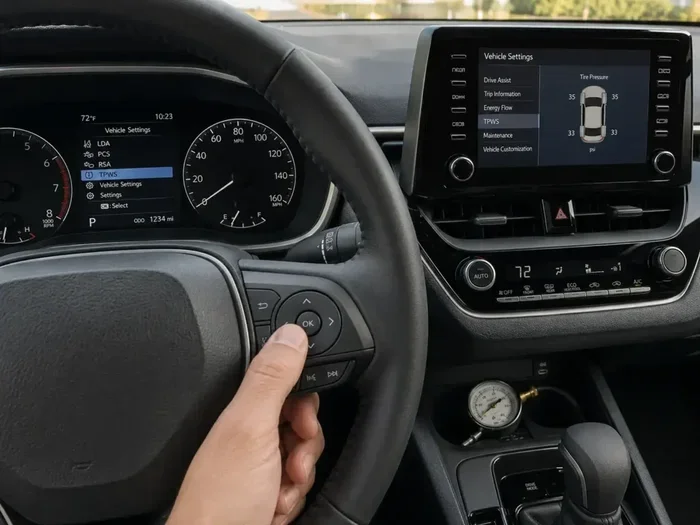
- Press the steering wheel menu button. Use the arrow buttons on the steering wheel to scroll through the display options.
- Find the “Maintenance” or “Service” menu. This is usually in the vehicle information or settings section of your dashboard display.
- Select “Reset Maintenance.” Press the “OK” or “Enter” button on the steering wheel to confirm.
- Hold the reset button for 3 seconds. The system will clear the maintenance reminder and display a confirmation message.
Method 2: Using the Trip Meter for Newer Models
Some newer Toyota models still use the trip meter method, similar to older versions. This works well for models like the Toyota Tacoma and certain 4Runner trims. You can also learn more about where Toyota Tacomas are made if you are curious about your truck’s origins.
- Turn the ignition to the ON position. Do not start the engine.
- Press the trip meter button on the dashboard. Cycle through the display until you see the maintenance screen.
- Press and hold the trip meter button. Hold it for about 5 seconds until the light resets.
- Turn the ignition off and back on. Check that the maintenance light is no longer visible.
Method 3: Using an OBD-II Scanner
For the newest Toyota models, especially 2019 and later, the maintenance reset process can be more complex. These vehicles often require an OBD-II diagnostic scanner to clear the maintenance reminder fully. You can buy a basic scanner for under $30 at most auto parts stores.
- Plug the scanner into the OBD-II port under your steering column.
- Turn the ignition to ON and follow the scanner prompts.
- Select “Clear Maintenance Reminder” or “Reset Service Light.”
- Disconnect the scanner and start your engine to confirm the light is off.
This method also works well if the trip meter method does not clear the light. It is a reliable backup option for any Toyota owner.
Model-Specific Reset Instructions
Toyota offers many different models, and each one may have a slightly different reset process. Here are some of the most popular models and their specific reset methods.
Toyota Camry Maintenance Light Reset
The Camry is one of the best-selling sedans in America, and resetting its maintenance light is very straightforward. For Camry models from 2007 to 2017, use the steering wheel menu method. For older Camry models from 2000 to 2006, use the trip meter button method. If you are curious about the value of your vehicle, check how much a Toyota Camry typically costs to understand your car’s market position.
Toyota Highlander Maintenance Light Reset
The Highlander uses a similar reset process to the Camry for most model years. The trip meter method works well for older Highlanders, while newer models from 2010 onward respond best to the steering wheel controls. Taking care of your Highlander’s maintenance schedule also helps protect your investment, whether you keep it stock or customize it.
Toyota Tacoma Maintenance Light Reset
Tacoma owners have a couple of options depending on the year. For Tacomas made before 2009, the trip meter reset method is your best bet. For 2009 and newer models, try the steering wheel button approach first. If neither works, an OBD-II scanner will get the job done. If you are interested in the background of your vehicle, you can also explore where Toyota Tacomas are made to learn more about your truck’s heritage.
Common Mistakes When Resetting the Toyota Maintenance Light
Even though the reset process is simple, mistakes do happen. Here are the most common errors Toyota owners make and how to avoid them.
- Resetting without completing the service: This is the biggest mistake. If your oil is not changed, resetting the light just clears the reminder. Your engine still needs fresh oil. Always complete the service first.
- Not holding the button long enough: Many people release the trip button too early. Hold it for a full 3 to 5 seconds during the reset process.
- Using the wrong ignition position: Make sure you are in the ON position, not the ACC position. The engine does not need to run, but the electrical system must be active.
- Ignoring other warning lights: If the maintenance light comes on alongside other warnings, there may be a bigger issue. Do not just reset and move on.
- Trying the wrong method for your model year: Always confirm which reset method matches your specific Toyota model and year. Using the wrong process will not work and may cause confusion.
Avoiding these mistakes saves you time and frustration. It also ensures your Toyota’s maintenance system works correctly going forward.
When to Seek Professional Help
Most of the time, resetting the Toyota maintenance light is a DIY task. But there are situations where professional help makes sense. If you have tried all the methods and the light keeps coming back, there may be a deeper issue. A certified Toyota technician can run a full diagnostic scan and identify any problems.
Also, if you are not comfortable working with your car’s electronics, it is perfectly fine to visit a dealership or trusted mechanic. Many service centers will reset the maintenance light for free as part of an oil change or routine service visit. The cost of a basic oil change and service reset is usually quite reasonable, especially if you compare it to the cost of potential engine damage from missed maintenance.
Regular maintenance keeps your Toyota running at its best. Whether you handle the reset yourself or visit a professional, staying on top of your service schedule is what matters most.
Final Thoughts on Resetting Your Toyota Maintenance Light
Resetting the Toyota maintenance light is one of the easiest things you can do as a car owner. It takes just a few minutes and requires no special tools for most models. Whether you drive a sleek Camry, a rugged Tacoma, or a spacious Highlander, the process is manageable and straightforward.
The key is to remember that resetting the light is not a substitute for actual maintenance. Always complete your oil changes, tire rotations, and other scheduled services before clearing the reminder. This keeps your Toyota running smoothly for years to come.
Use the steps in this guide for your specific model and year. If you run into any trouble, an OBD-II scanner or a quick visit to your local service center will solve the problem. Now you have everything you need to handle that maintenance light with confidence.
Frequently Asked Questions
How do I reset the maintenance light on a Toyota Camry?
For Camry models from 2007 to 2017, use the steering wheel menu controls to navigate to the maintenance reset option. For older Camry models, use the trip meter reset method by holding the trip button while cycling the ignition. The process takes less than two minutes and requires no special tools.
Why does my Toyota maintenance light keep coming back after I reset it?
This usually means the underlying service has not been completed yet. If your oil has not been changed or your maintenance is still overdue, the light will return. Make sure you finish all required services first, then reset the light again using the correct method for your model.
Can I reset the Toyota maintenance light without a trip meter?
Yes. For models without a traditional trip meter, you can use the steering wheel controls and digital display menu to find the maintenance reset option. On very new models from 2019 onward, an OBD-II scanner may be necessary if the menu method does not work.
Is it safe to drive with the maintenance light on?
Yes, it is generally safe. The maintenance light is a reminder, not a warning of a serious problem. However, you should schedule your service soon. Ignoring routine maintenance for too long can lead to engine wear and other issues over time.
What is the difference between the maintenance light and the check engine light?
The maintenance light is a service interval reminder that tells you it is time for routine care like an oil change. The check engine light indicates an actual problem with your vehicle’s engine or emissions system. The check engine light needs immediate attention, while the maintenance light can usually be reset after completing service.
Do I need any special tools to reset the Toyota maintenance light?
For most Toyota models, you do not need any special tools. The trip meter method and steering wheel controls work without any equipment. However, newer models from 2019 onward may benefit from a basic OBD-II scanner, which costs around $20 to $30 and is available at most auto parts stores.
=== CONCLUSION ===
Knowing how to reset the Toyota maintenance light is a valuable skill for any Toyota owner. It saves you a trip to the dealer and gives you confidence in managing your vehicle’s upkeep. We covered methods for older models, newer models, and specific popular vehicles like the Camry, Highlander, and Tacoma. The process is simple, fast, and free.
Remember to always complete your scheduled maintenance before resetting the light. This keeps your Toyota in great shape and prevents costly repairs down the road. Whether you use the trip meter method, the steering wheel controls, or an OBD-II scanner, you now have everything you need to handle this task yourself.
Keep this guide saved for your next maintenance reminder. Share it with fellow Toyota owners who might benefit from it. And most importantly, stay on top of your service schedule so your Toyota continues to run its best for many miles ahead.