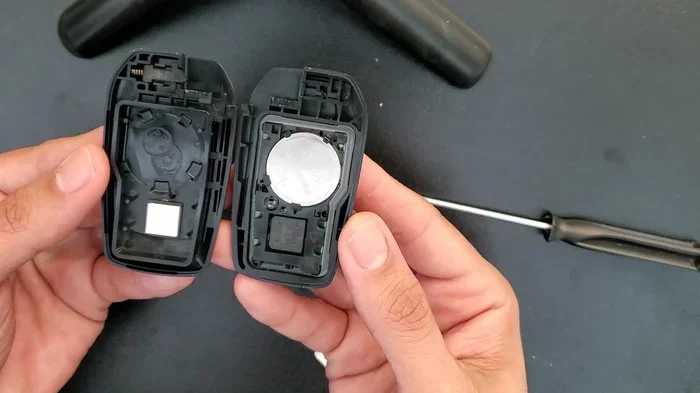
how to change the battery in a toyota key fob easily
Changing the battery in your Toyota key fob is a simple DIY task you can finish in minutes. Most Toyota remotes use a common CR2032 coin cell battery that costs just a few dollars. This guide walks you through every step, from opening the fob to testing the new battery, so your Toyota remote works like new again.
Your Toyota key fob stops working at the worst possible time. Maybe you are standing in the rain outside the grocery store. Or you are rushing to a meeting and cannot get into your car. A dead key fob battery is annoying, but it is also an easy fix you can handle yourself.
Many Toyota owners worry that changing the battery is complicated. They think they need to visit a dealer or pay a technician. That is not true at all. Changing the battery in a Toyota key fob is one of the simplest maintenance tasks you can do. In most cases, it takes less than five minutes.
This guide covers everything you need to know. We will look at which battery your fob uses, how to open it safely, and how to test the new one. We also share tips to make the battery last longer. Whether you drive a Camry, a Highlander, or a Tacoma, this guide works for you. In fact, Toyota builds many of its vehicles in places like the United States and Japan, and their key fobs follow a similar design across the lineup. If you have ever wondered about Toyota and Subaru ownership, it is worth noting that both brands share some technology, but Toyota key fobs remain straightforward to service on your own.
Let us get started. By the end of this article, you will feel confident replacing the battery yourself. No more fumbling with a dead remote. No more waiting at the dealership.
Key Takeaways
- Easy DIY Fix: You do not need a dealer or special tools to swap the battery in your Toyota key fob.
- Common Battery Type: Most Toyota key fobs use a CR2032 coin cell battery, which is easy to find.
- Quick Process: The entire battery change takes about 5 to 10 minutes.
- Cost Savings: Doing it yourself saves you time and money compared to a dealership visit.
- Prevent Signal Loss: Regular battery replacement keeps your Toyota remote reliable and responsive.
- Reset May Be Needed: Some Toyota models require a simple reset after the battery swap.
📑 Table of Contents
- Why Your Toyota Key Fob Battery Dies
- What Battery Does Your Toyota Key Fob Need
- Step-by-Step Guide to Changing the Battery
- How to Tell If the New Battery Is Working
- Tips to Make Your Toyota Key Fob Battery Last Longer
- When to Replace the Entire Key Fob
- Common Mistakes to Avoid When Changing the Battery
- Expert Insights on Toyota Key Fob Maintenance
- Key Takeaways
- Conclusion
Why Your Toyota Key Fob Battery Dies
Key fob batteries do not last forever. Over time, the power inside the battery runs out. This happens with every electronic device that uses a small coin cell. Understanding why the battery dies helps you plan replacements and avoid surprises.
Most Toyota key fob batteries last between two and four years. However, heavy use can shorten that lifespan. If you press the lock or unlock button dozens of times each day, the battery drains faster. Cold weather also affects battery performance. In winter months, a battery that was working fine in summer may suddenly fail.
Signs Your Toyota Key Fob Battery Is Low
Your fob gives you warning signs before it dies completely. Watch for these common signals:
- Reduced range: You need to stand closer to the car for the remote to work.
- Delayed response: The lock or unlock action takes longer than usual.
- Intermittent working: The fob works sometimes but not every time.
- Dashboard warning: Some Toyota models show a key fob battery alert on the dashboard.
- Push button start issues: The engine does not start when the fob is near the ignition.
If you notice any of these signs, it is time to replace the battery. Waiting too long means you could end up stranded with a completely dead fob. Replacing the battery early keeps you ahead of the problem.
What Battery Does Your Toyota Key Fob Need
Knowing the right battery is the first step. Using the wrong type can damage the fob or not fit properly. Most Toyota key fobs use a standard CR2032 coin cell battery. This is one of the most common batteries in the world. You can find it at almost any drugstore, grocery store, or online retailer.
CR2032 Battery Details
The CR2032 is a 3-volt lithium coin battery. It is small, flat, and round. The number 2032 means the battery is 20 millimeters wide and 3.2 millimeters thick. These batteries cost about one to three dollars each. They last a long time in standby mode, which is why they work so well in key fobs.
Some older Toyota models may use a different battery type. Always check your owner’s manual before purchasing a replacement. The manual lists the exact battery specification for your specific fob model. If you do not have the manual, the CR2032 works for the vast majority of Toyota vehicles. This includes popular models like the Camry, RAV4, and Tacoma. You can also check the current battery inside the fob to confirm the type before buying a new one.
Where to Buy Replacement Batteries
You have many options for buying a CR2032 battery:
- Local stores: Walmart, Target, CVS, Walgreens, and most grocery stores carry them.
- Auto parts stores: AutoZone, O’Reilly, and Advance Auto Parts stock key fob batteries.
- Online retailers: Amazon and other online stores sell them in multi-packs at a lower price.
- Toyota dealership: You can buy one at the dealer, but it costs more for the same battery.
Buying in bulk is a smart move. Since you will likely need to replace the battery again in a few years, having spares on hand saves you a trip to the store later.
Step-by-Step Guide to Changing the Battery
Now for the main part. Changing the battery in your Toyota key fob is straightforward. Follow these steps carefully, and you will have a working remote in no time.
Step 1: Gather Your Tools
You need very few tools for this job. Here is what to have ready:
- A replacement CR2032 battery
- A small flathead screwdriver or a thin plastic pry tool
- A clean, soft cloth
- A well-lit workspace
That is it. No special equipment required. You do not need to visit a mechanic or a Toyota dealer. This simple task is perfect for anyone, regardless of technical skill.
Step 2: Open the Key Fob
Toyota key fobs have a small seam or groove along the edge. This is where you will insert your tool to pry the case open. Follow these steps:
- Look at the side of your fob. Find the thin line or groove that runs along the seam.
- Insert the flathead screwdriver or pry tool gently into the groove.
- Twist the tool slightly to pop the first clip loose.
- Work your way around the fob, releasing each clip one at a time.
- Carefully separate the two halves of the fob case.
Go slowly. The clips are small and can break if you force them. If the fob feels stuck, stop and look for a clip you may have missed. Patience is your best friend here.
Step 3: Remove the Old Battery
Once the fob is open, you will see the battery sitting in a small compartment. It is held in place by a metal clip or a small plastic holder. Here is what to do:
- Note the orientation of the old battery. The positive side (marked with a +) usually faces up.
- Gently lift the old battery out using the screwdriver or your fingernail.
- Dispose of the old battery properly. Do not throw it in regular household trash. Many stores have battery recycling bins.
Take a moment to inspect the inside of the fob. Look for any corrosion or dirt on the battery contacts. If you see any buildup, gently clean it with a dry cloth. Corrosion can cause the new battery to fail prematurely.
Step 4: Insert the New Battery
Take your new CR2032 battery out of its packaging. Place it into the fob compartment with the correct orientation. The positive side should face up, matching the position of the old battery. Press the battery down gently until it clicks into the holder.
Make sure the battery sits flat and secure. A loose battery will not make proper contact, and your fob will not work.
Step 5: Close the Fob
Align the two halves of the fob case carefully. Press them together firmly. You should hear or feel each clip snap into place. Go around the entire edge to make sure all clips are secure. A fob that is not fully closed may let moisture in, which can damage the internal electronics.
Step 6: Test the New Battery
Now comes the satisfying part. Stand near your Toyota and press the lock or unlock button. The fob should respond immediately. Test all buttons, including the panic button and any remote start features if your model has them.
If the fob works, you are done. If it does not, double-check the battery orientation. Make sure the positive side faces up. Also check that the battery is fully seated and making contact. If the fob still does not work after these checks, the new battery may be defective. Try a different CR2032 battery.
How to Tell If the New Battery Is Working
After you replace the battery, you want to confirm everything works properly. Testing is quick and easy. Stand within a few feet of your Toyota and try the following:
- Lock the doors: Press the lock button. All doors should lock with a clear beep.
- Unlock the doors: Press the unlock button. All doors should unlock.
- Trunk release: If your fob has a trunk button, test it too.
- Remote start: Some Toyota models support remote start. Test this feature if available.
- Push button start: Get in the car and press the start button with the fob inside the cabin.
If all buttons respond quickly and consistently, your new battery is working perfectly. You have successfully completed the battery replacement.
For Toyota owners who also want to understand more about their vehicles, learning about where Toyota Tacomas are made can be interesting alongside your DIY maintenance journey. Toyota builds its trucks in places like San Antonio, Texas, and the key fob technology remains consistent across their full lineup.
Tips to Make Your Toyota Key Fob Battery Last Longer
You just spent a few minutes changing the battery. The last thing you want is to do it again in six months. Here are some practical tips to extend the life of your new battery:
- Avoid extreme temperatures: Do not leave your fob in a hot car or a freezing car for long periods. Heat and cold both drain batteries faster.
- Remove the fob from the keychain: Heavy keychains put pressure on the fob buttons. This can cause the fob to send signals unnecessarily, draining the battery.
- Do not press buttons unnecessarily: Every button press uses a small amount of power. Only press buttons when you actually need to.
- Store the fob properly: When not in use, keep the fob in a drawer or bag away from other electronics that might interfere with the signal.
- Replace batteries proactively: Do not wait until the fob stops working. Change the battery every two to three years as a preventive measure.
These small habits add up. They keep your fob battery healthy and your Toyota remote working reliably for years.
When to Replace the Entire Key Fob
Sometimes a new battery is not enough. If you replace the battery and the fob still does not work, the problem may be deeper than a dead battery. Here are signs that you need a full fob replacement:
- Cracked or damaged fob case: Physical damage can let moisture inside and destroy the circuit board.
- Buttons that stick or do not respond: Worn-out buttons are a sign of internal wear.
- Water damage: If the fob has been submerged in water, the electronics may be fried.
- Interference from other devices: Some electronic devices can interfere with the fob signal. Try moving away from other remotes and electronics to rule this out.
If you need a new fob, you have several options. You can buy one from a Toyota dealership, an auto parts store, or online. The cost varies depending on the model and year of your vehicle. For reference, a Toyota Camry key fob replacement typically costs between 50 and 200 dollars depending on features. A Toyota Highlander fob may cost more due to additional smart key features.
Some fob replacements require programming at a dealership. However, many newer Toyota models allow you to program the fob yourself by following the instructions in your owner’s manual. Always check the manual first before spending money on dealer programming.
Common Mistakes to Avoid When Changing the Battery
Even simple tasks come with pitfalls. Here are common mistakes people make when changing their Toyota key fob battery:
- Using the wrong battery type: Always double-check that you are using a CR2032. Using a different battery can damage the fob.
- Forcing the fob open: If the case does not pop open easily, you may be missing a hidden clip. Stop and look more carefully.
- Touching the battery contacts with metal tools: This can cause a short circuit. Use a plastic pry tool or your fingernail when possible.
- Ignoring corrosion: If the battery contacts look green or white, clean them before inserting the new battery.
- Not testing after replacement: Always test the fob immediately after changing the battery. This confirms the job was done correctly.
Avoiding these mistakes saves you time and prevents damage to your fob. A careful, methodical approach works best.
Expert Insights on Toyota Key Fob Maintenance
Automotive professionals agree that key fob battery maintenance is one of the most overlooked aspects of car ownership. Many drivers only think about their fob when it stops working. Taking a proactive approach saves you from the frustration of a dead remote at the worst moment.
Toyota dealerships recommend keeping a spare CR2032 battery in your glove box at all times. This simple habit means you are never stranded if your fob dies unexpectedly. The battery takes up almost no space and costs very little. It is one of the smartest small investments you can make as a Toyota owner.
Additionally, if you are curious about how much a Toyota vehicle costs or want to explore models with advanced key fob features, understanding the full picture of Toyota ownership helps. For instance, Toyota Camry pricing varies by trim, and higher trims often come with enhanced keyless entry and smart key systems that rely on reliable fob batteries.
Key Takeaways
- Simple DIY Task: Changing the battery in your Toyota key fob is easy and takes just a few minutes.
- CR2032 Battery: This is the standard battery for most Toyota key fobs and costs only a few dollars.
- No Tools Needed: A flathead screwdriver or pry tool is all you need to open the fob.
- Test After Replacement: Always test all fob functions immediately after installing the new battery.
- Preventive Maintenance: Replace the battery every two to three years to avoid unexpected failures.
- Full Replacement When Needed: If a new battery does not fix the problem, the fob itself may need replacement.
Conclusion
Changing the battery in a Toyota key fob is one of the easiest and most useful things you can do for your vehicle. It saves you a trip to the dealership, saves you money, and gets you back on the road quickly. With a CR2032 battery, a flathead screwdriver, and this guide, you can handle the job in under ten minutes.
Do not wait until your fob dies completely. Pay attention to the warning signs and replace the battery early. Keep a spare battery in your glove box for emergencies. These small habits keep your Toyota remote working reliably day after day.
Remember, every Toyota model from the Camry to the Tacoma uses similar key fob technology. Once you learn how to change the battery in one fob, you can do it for any Toyota vehicle you own or drive. Share this guide with friends and family who drive Toyotas. They will thank you for the save.
Stay proactive, stay prepared, and keep your Toyota key fob in top shape. A working remote means a smoother, more convenient driving experience every single day.
Frequently Asked Questions
How do I know which battery my Toyota key fob uses?
Most Toyota key fobs use a CR2032 coin cell battery. You can confirm this by opening the fob and looking at the existing battery, or by checking your owner’s manual. The battery type is clearly marked on the battery itself as well.
Can I use a rechargeable battery in my Toyota key fob?
It is not recommended. Standard CR2032 non-rechargeable batteries are designed for low-drain devices like key fobs. Rechargeable batteries have a slightly different voltage and may not work reliably with the fob’s electronics.
How long does a Toyota key fob battery last?
A Toyota key fob battery typically lasts between two and four years. Heavy daily use, extreme temperatures, and frequent button presses can shorten that lifespan. Replacing the battery proactively every two to three years is a good practice.
What should I do if the key fob still does not work after replacing the battery?
First, double-check that the battery is inserted with the correct orientation. Make sure the battery is fully seated and the contacts are clean. If the fob still does not work, the battery may be defective, or the fob itself may need repair or replacement.
Do I need to reprogram my Toyota key fob after changing the battery?
In most cases, no. Simply replacing the battery does not require reprogramming. However, if the fob does not work after the battery change, you may need to reset it by holding the unlock button on the fob while sitting in the car with the door closed.
Where can I buy a CR2032 battery for my Toyota key fob?
CR2032 batteries are available at most grocery stores, drugstores, auto parts stores, and online retailers. They cost between one and three dollars each. Buying a multi-pack is a smart way to save money and always have a spare on hand.